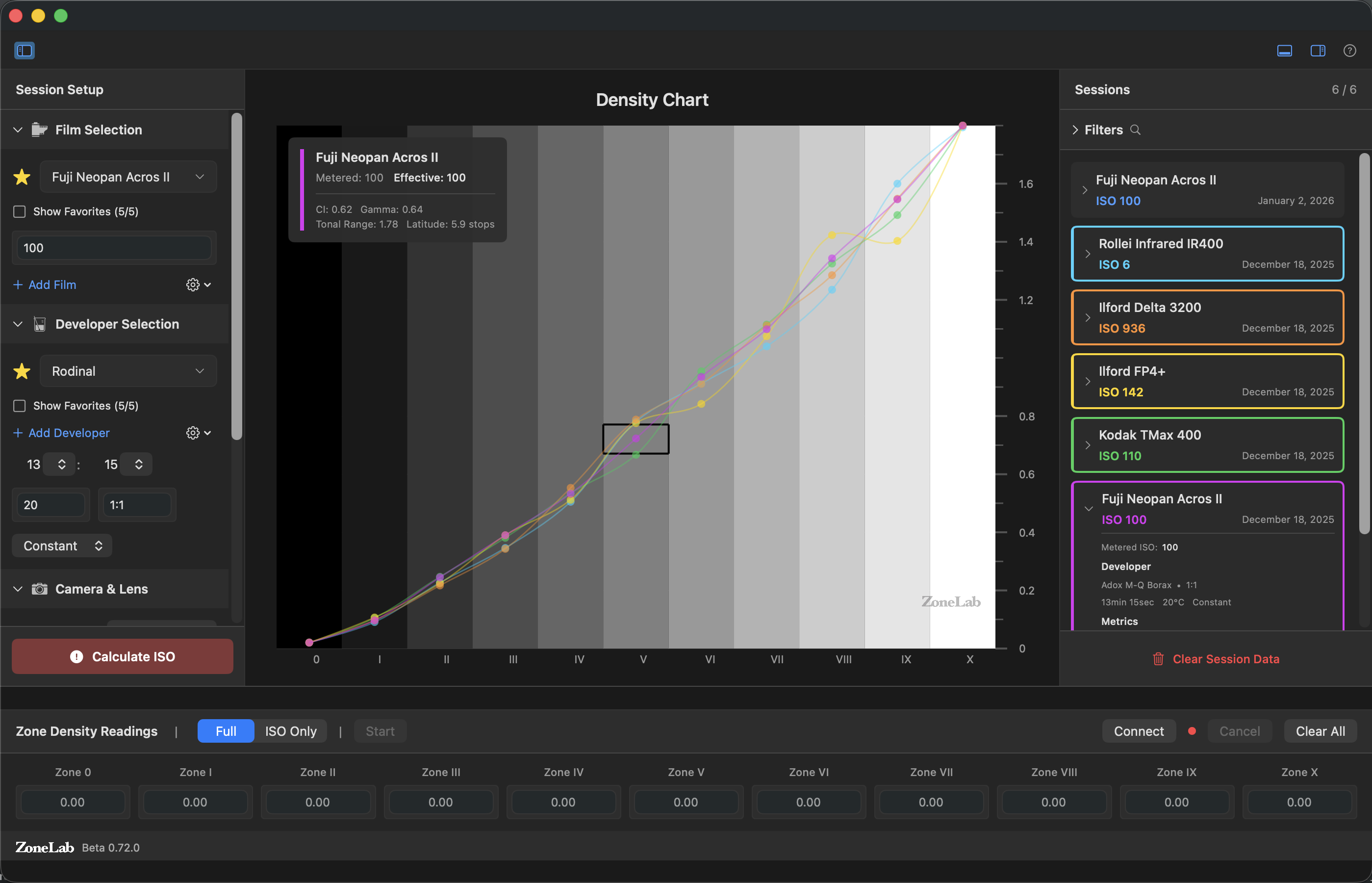
Yes, there's an ISO value associated with every film remaining on the market (no more ASA). However, those of us who used film for any length of time often didn't use the published (and DX-coded) ISO for the films we worked with. In the case of slide film, many tried to preserve more highlight detail by using lower ISO values (e.g. ISO 40 instead of ISO 50 for Velvia). In the case of negative film—particularly black and white negative film—many who processed their own rolls used non-standard processing, which can have an impact on what the real response curve looks like. Ansel Adams was a proponent of using non-standard processing, and his Zone System gave him a way of describing white to black responses from film to print. So what do you do if you're processing your own black and white film and doing so with a non-standard or any push/pull method? You do something akin to what all of us used to do, though now you have some automated help via ZoneLab. Basically, it works like this: Sounds simple enough, right? But you probably noted Step 3 and wonder how you do that. Either you have a processing lab do that for you or you own your own densitometer (e.g. Printalyzer, see link below). Yes, working with analog film can be geeky. In college I did sports work for both the school and for ABC Sports, and often was developing my own images immediately after games. Getting exposure and processing aligned is a right of passage for film users, and I had to do the above with much more primitive tools and some advanced math.